
Steps
- Navigate to Gang Sheet Settings – 1. Click on the Gang Sheet tab in your settings. 2. 3. Click Update More to expand advanced settings. 4. 5. You can also navigate through Settings → Settings → Gang Sheet . 6.
- Set Up File Name Format – Within the Gang Sheet tab, locate the section for file name customization: - Gang Sheet File Name Format - Edit Request Email - Print File Name - File Name Position - File Name Height
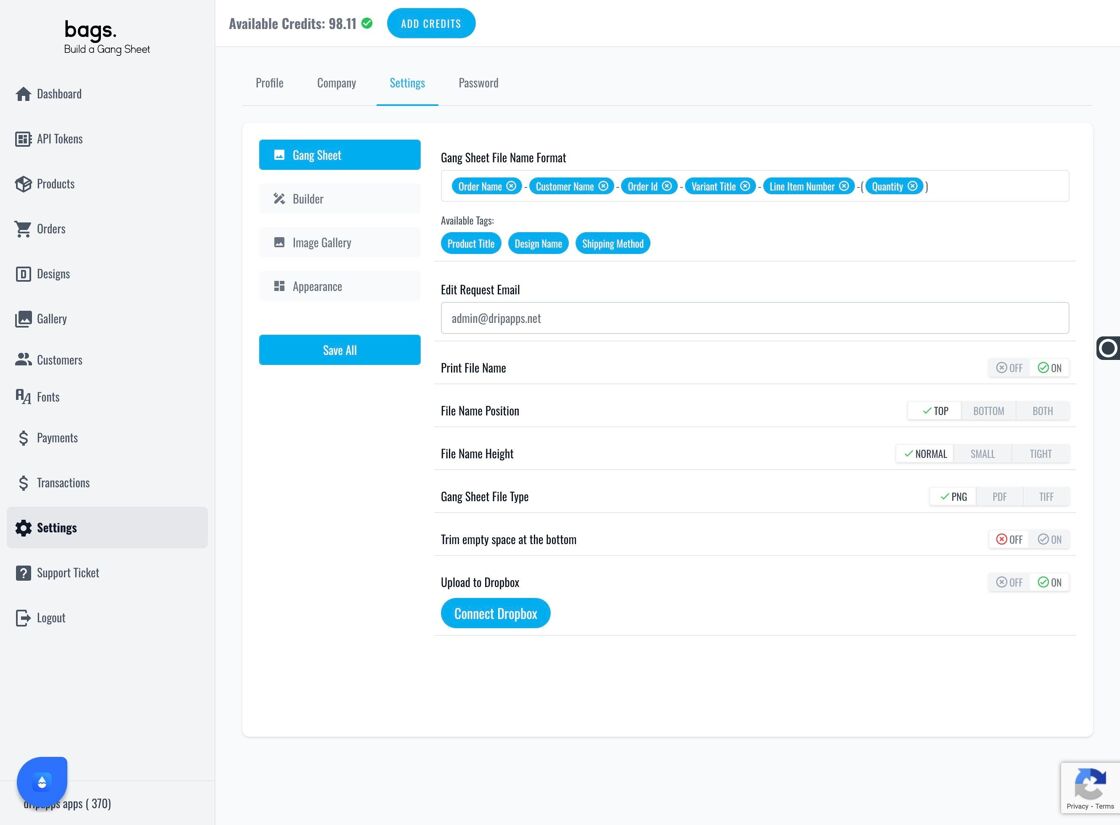
Gang Sheet section - Customize File Name Display – 1. Use the Gang Sheet File Name Format to label gang sheets at the top, bottom, or both for print clarity. 2. 3. Add multiple tags that will be printed directly on the gang sheet. 4. 5. Remove unwanted tags with a simple click. 6.
- Enable File Name on Printed Sheet – 1. Activate Print File Name to apply file name formatting to the actual print. 2. 3. Choose your desired File Name Height . 4. 5. Select the File Name Position — top, bottom, or both. 6.
- Apply Settings to Individual Products – 1. For settings to apply, ensure Print File Name Format is turned on for each product. 2. 3. Go to the Products tab to see all listings. 4. 5. Select your desired configuration. 6.
- Save Changes – 1. Be sure to click Submit after any changes. 2. 3. Finally, hit Save All to lock in your updates. 4.